Never sleeps.
Never rented.
AiFlow runs voice, video, and text agents on your own servers. Your database, your phone numbers, your model keys. You buy the licence once and it never expires.
curl -fsSL https://meridflow.com/downloads/install-aiflow.sh | bashDemo mode is free and does not expire. The 14 day trial unlocks everything, with no card.
You own the deployment
Your infrastructure, your database, your phone numbers. The licence carries an Ed25519 signature your own server checks, so there is no remote switch to flip and no upgrade you can be forced into.
Nothing is billed per minute
One price, paid once. Success is not charged as consumption, so a busier support line or a bigger outreach campaign never costs more to operate.
Running this afternoon
Demo mode is free and does not expire. Production is a compose file and a licence key, not a procurement cycle.
Software you rent is software that charges you for succeeding.
The industry has spent thirty years moving buyers from software they own to software they are permitted to use. It is an excellent arrangement for vendors: the revenue compounds, and the customer is on the hook every month forever.
Voice AI took it further. The meter runs per minute, so the more your customers engage, the more you pay. Deflecting a ticket, recovering a cart, calling a lead back quickly: every one of those is a win that arrives with an invoice attached.
The owned license stops incurring fees immediately. Vapi costs pass the purchase price in month 3 and keep growing endlessly.
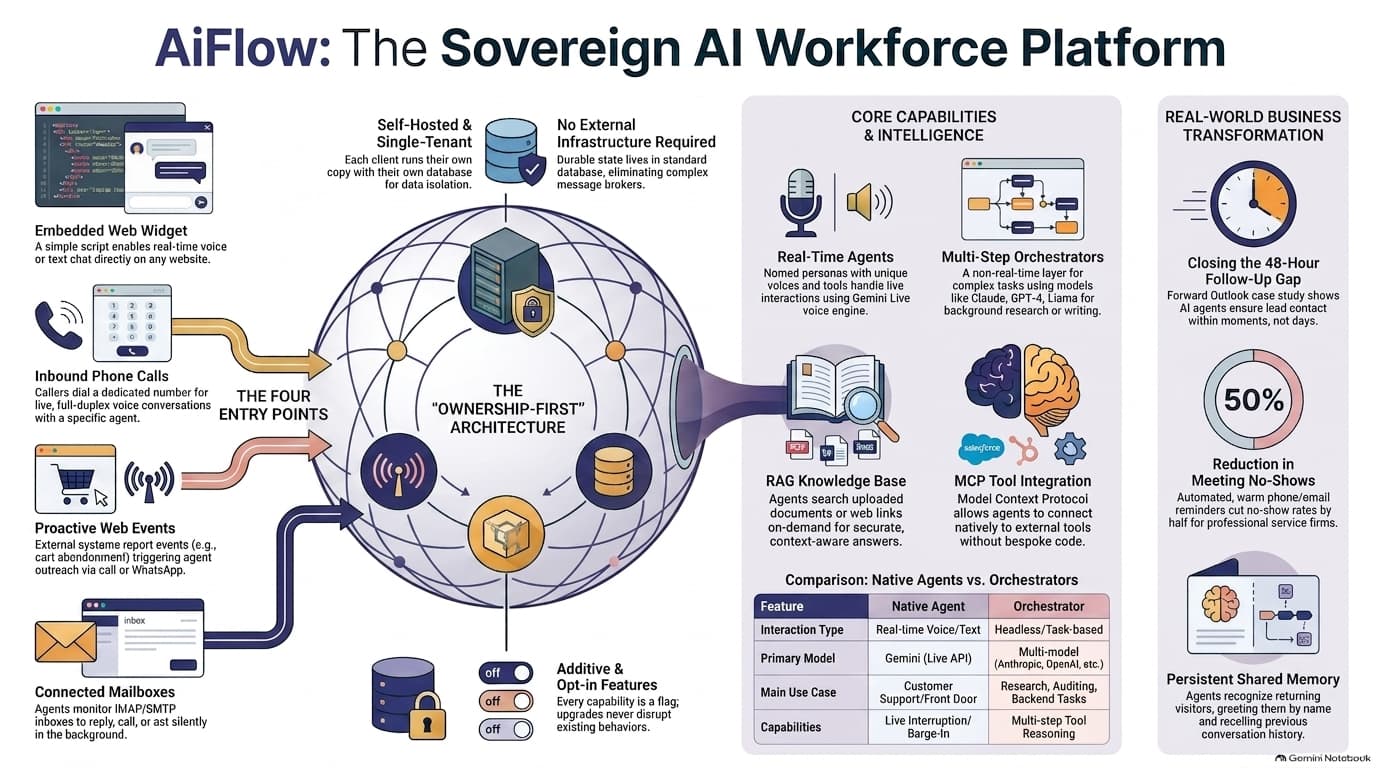
Four ways in, the same agent behind all of them.
AiFlow Session Engine
Shared state memory & unified conversational context across every channel. Interruption handling and tool executions run seamlessly in realtime.
{"stream": "24kHz Opus", "duplex": true, "screen_share": "active"}
Answers the phone
Map a real number to an agent. Full duplex audio with natural barge-in, and several agents can share one number with callers routed to whoever is free.
Sees what callers see
A visitor can turn on their camera, share a screen, or hand over a photo or a PDF mid-conversation, and the agent works from what is actually in front of them.
Calls when something happens
Post an event from a form handler, a CRM, or a cron job. Conditions decide whether to place a call, send a message, or run a task with nobody on the line.
Reads your documents
PDFs, Word files, a URL, or a whole sitemap for what it should know. Short written procedures, matched on when to use them, for what it should do.
Delegates to other models
The live voice runs on Gemini because it has to. Longer work goes to an Orchestrator on Claude, GPT, or a model you host, and the answer comes back in the agent voice.
Hands over to a human
When a conversation needs a person, it dials your team, briefs whoever picks up with a spoken summary, and connects the caller through.
The whole architecture, on one screen.
What has landed recently.
- v7.3
Skills
Short written procedures matched on when to use them, loaded whole. Distinct from a knowledge base document, which is searched for a passage.
- v7.4
A catalog of MCP servers
Notion, Linear, Atlassian, Stripe, Cloudflare, Sentry, and more, each verified end to end. One click instead of an OAuth setup.
- v7.5
Scoped API keys
One scope per capability rather than a single all-or-nothing grant, with no wildcard. A key that reads transcripts cannot place a call.
- v7.6
Federation
One deployment can delegate to another, with a hop and trace guard that makes a loop impossible, plus inbound rate limits and a circuit breaker.
- v7.8
Webhook events
Up from eleven. Campaign lifecycle, contact changes, approvals, inbound email, and delivery status all became subscribable.
- v7.9
Better outbound calling
Numbers screened before dialling, voicemail detected and recorded honestly, per-call quality metrics, and transfers routed through TaskRouter.
One command, then a licence key.
curl -fsSL https://meridflow.com/downloads/install-aiflow.sh | \
  sudo bash -s -- \
  --option caddy \
  --version 8.2.0 \
  --license-tier pro \
  --license-key AIFLOW1.K1.YOUR_KEY \
  --api-domain api.yourcompany.com \
  --admin-domain admin.yourcompany.com \
  --admin-email devops@yourcompany.com \
  --install-docker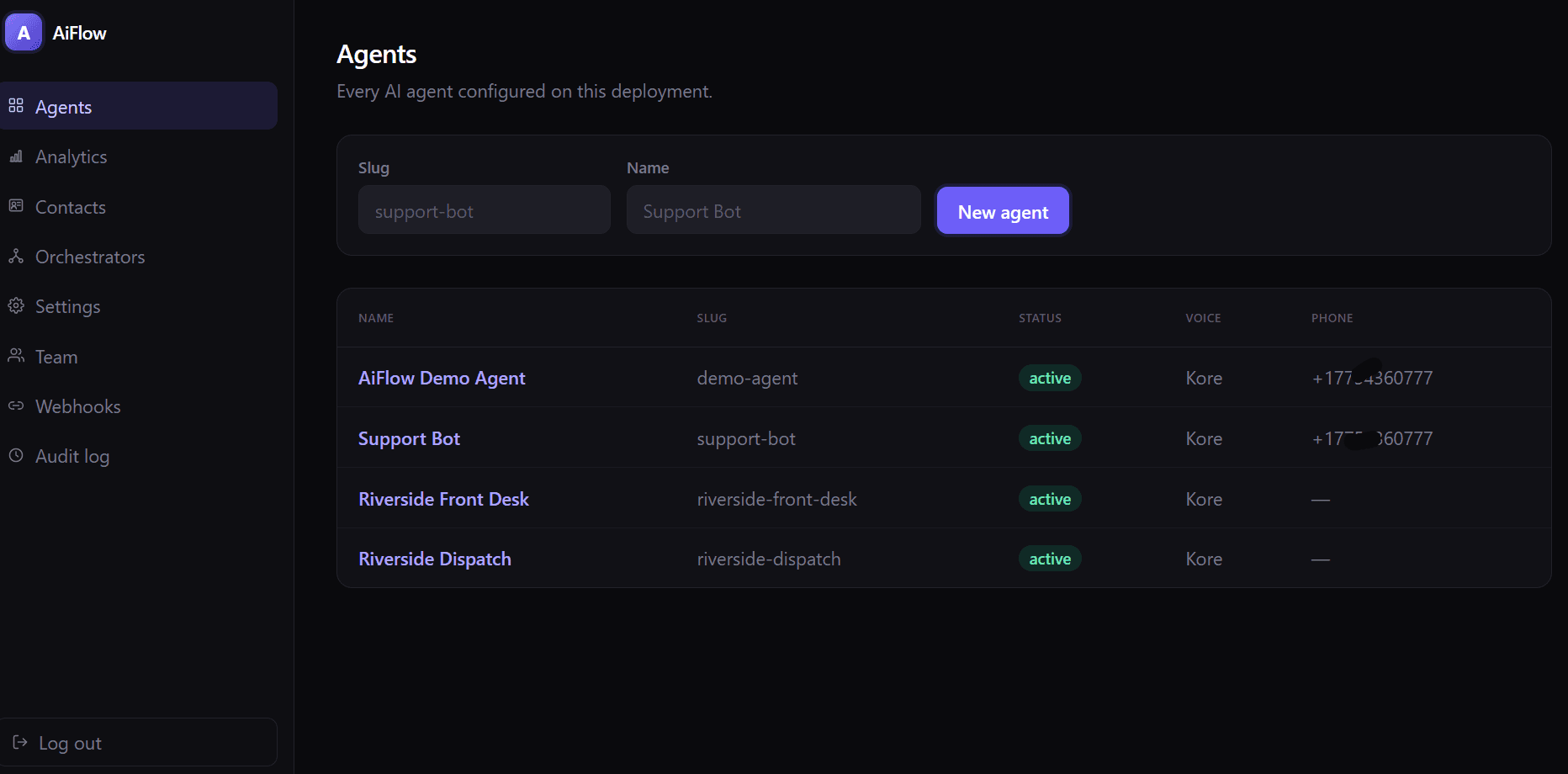
It speaks MCP in both directions.
AiFlow Core
MCP Dual-StackZero-latency RPC bridge with sandboxed memory isolation.
mcp.tools/hubspot: { "call": "crm.deal.update", "stage": "qualified" }
Including the awkward ones.
Is it genuinely a one-time payment?
Yes. You pay once and run the software on your own infrastructure for as long as you like. There is no per-minute charge, no per-seat charge, and no renewal required to keep it running. You do pay Google for Gemini and Twilio for telephony, but you pay them directly at their rates, with nothing added by us.
What happens when my updates window ends?
Nothing stops. The version you own keeps running exactly as it did, forever, offline. What ends is your access to new releases and support. You can renew for updates if you want them, or stay where you are indefinitely. A licence carries the highest major version it activates, so upgrading to a future major version is a decision you make when it suits you.
Can you switch off my deployment?
No, and we will not pretend otherwise. Your licence verifies offline using a signature your deployment checks locally, so it never contacts us. That means we genuinely cannot reach into a running deployment. Revoking a licence stops future issuance, image pulls, and support; it cannot stop software that is already running. That is the honest cost of never phoning home, and we think it is worth it.
Where does my data go?
Onto your own infrastructure and nowhere else. Each deployment is single tenant: your own database, your own credentials, your own phone numbers. Conversations, transcripts, and knowledge base documents never touch shared infrastructure, and never reach us. SQLite is the default and needs nothing extra, or you can point it at your own Postgres.
Do I have to use Gemini?
For the live voice and video conversation, yes, and that is a technical boundary rather than a preference: no other provider currently offers an equivalent realtime bidirectional audio API. Everything else is open. An Orchestrator, the layer that carries out multi-step delegated tasks, runs on Anthropic, OpenAI, a locally hosted model, or any of a hundred others. An agent on a live phone call can hand a task to a Claude-backed Orchestrator mid-conversation and speak the answer back in its own voice.
Do I need Twilio?
Only for phone calls and WhatsApp. The embeddable website widget, in both text and voice, needs nothing beyond a Gemini key. Plenty of deployments start as a widget on a marketing site and add a phone number later.
How is this priced if not by the minute?
By capacity rather than throughput: how many conversations run at once, how many agents you configure, how many people administer it. Those are the things a self-hosted deployment can measure honestly at a single instant. Metering minutes would require your deployment to report usage back to us, which would break the one guarantee that makes the product what it is.
How many instances can one licence run?
Your plan states a number: one on Basic, two on Pro, unmetered on Enterprise. Where you scale out, the software enforces it. Instances of one deployment share a database, so they count each other there, and an instance beyond your number keeps its dashboard and finishes the calls it already has but starts no new ones. That needs no phone home and no hardware lock: the count never leaves your own database, and an air-gapped deployment behaves exactly like a connected one. Where we cannot enforce it is across wholly separate deployments with separate databases, and we will not add a phone-home or a machine lock to change that, so there the number stays a term of the licence. Worth knowing: capacity limits like concurrent calls are counted against the database, so instances sharing one share that ceiling, while a separate deployment gets its own.
Is there a free way to try it?
Two. A demo mode that runs forever with one agent and a website widget, which is enough to put a working assistant on a site and see how it behaves. And a 14 day trial with every feature unlocked, self-serve, no card, for when you want to prove it on real work.
When is a per-minute competitor actually cheaper?
At low volume. If you are running a few hundred conversation minutes a month and expect to stay there, a metered platform will cost you less than a licence for a long time, possibly forever. The cost calculator on the pricing page will tell you so plainly rather than talking you out of it. The economics turn in our favour with volume and with time, not immediately.
What if my licence fails to verify at three in the morning?
It keeps working. A verification failure, whether from a clock drift, a mistyped key, or an expired trial, opens a 14 day grace period during which the deployment runs exactly as before, logs loudly, and shows an escalating banner in the dashboard. Nothing about a licensing problem should be able to take a phone line down overnight.
How do I tell it how to handle a situation, rather than what to know?
Write a skill. A knowledge base document is searched for the passage that answers a question; a skill is a short procedure you write, with a description of when it applies, and the whole thing loads at once when it matches. Half a refund policy is worse than none, which is why skills are not chunked. Orchestrators keep their own library separately. Demo mode allows five, every paid plan is unmetered.
We run several deployments. Can they work together?
Yes, on Enterprise. Federation registers other deployments as parent, child, or peer, and lets them delegate work to each other. The part worth knowing is what stops it going wrong: every delegation carries a hop count and a trace across the instance boundary, so a loop between two deployments is refused rather than merely logged, and that guard is on for everyone regardless of plan. Inbound work can be restricted to keys you have bound to a link, rate limited per link, and a link that keeps failing disables itself and says so.
If I let another system drive AiFlow, what can it actually do?
Exactly what you scoped its key for. AiFlow runs as an MCP server, and access is granted one scope per capability: placing calls, searching the knowledge base, reading transcripts, listing agents, recording events, looking up a contact, calling a custom tool, delegating to an Orchestrator. There is deliberately no wildcard scope, so a key issued for reading transcripts cannot place a call. Every call an outside client makes is written to the audit log.
Can I connect it to Salesforce, HubSpot, or Zendesk?
Salesforce and HubSpot have native connectors: OAuth, tokens encrypted at rest, and tools for upserting a contact, creating a ticket, and logging call activity. Beyond those, AiFlow speaks MCP in both directions. A catalog of vendor-hosted servers, Notion and Linear and Stripe and Sentry among them, connects in one click, and anything not in it connects by pasting a URL, because AiFlow implements the protocol rather than one connector per service. It also runs as an MCP server itself, so a client such as Zendesk or Claude Desktop can call into it. There is no native Zendesk connector, and that is the honest shape of that integration: it runs the other way round.
What if I need something it does not do?
Two answers depending on what it is. If it is an integration, custom tools and MCP connections let you extend an agent without us writing anything: describe the action, point it at an endpoint you control. If it is deeper than that, MeridFlow builds it. Custom tools, a bespoke MCP server over your internal systems, integration into an architecture you already have, or a managed and hardened deployment.
How many concurrent calls can one deployment handle?
That depends on your hardware and your Gemini and Twilio quotas rather than on the software, and each plan sets a licensed ceiling. Running more than one instance behind a load balancer is safe and is what the instance number on your plan is for: they share a database and count each other against it. What is not built is coordinated throughput scaling, so a second instance answers more sessions but does not make the outbound call queue itself go faster, and rate limits are per instance rather than pooled. If you need that shape of scale it is an engagement with us rather than a checkbox.
Can I run it under my own brand?
On Enterprise, yes. One setting changes the name, logo, and colours across the dashboard, the login page, and every embedded widget, with no fork and no rebuild. Enterprise also carries resale rights, which is what agencies running it for their own clients need.